
The best AI YouTube thumbnail generator depends on your starting material and editing needs. Compare Pikzels for a dedicated thumbnail workflow, Canva or Adobe Express for generation followed by design editing, vidIQ for video-based input, and YouTube Ask Studio for suggestions inside an eligible YouTube Studio account.
Affiliate disclosure: Thumb Maker is an independent affiliate publisher, not Pikzels. Links to Pikzels may earn Thumb Maker a commission. The alternatives are included to help readers choose a suitable workflow.
Official product and help pages checked: 12 October 2026. This is a comparison of published features, not a hands-on ranking or a test of output quality. Availability, pricing and limits can change.
Compare five AI YouTube thumbnail workflows
| Tool | Starting point and workflow | What to verify before choosing |
|---|---|---|
| Pikzels | Text prompts, thumbnail recreation, prompt-based edits and trained Persona/Style features. | Generation/edit credit use, annual payment and whether the thumbnail-specific workflow fits. |
| Canva | Describe a thumbnail, generate ideas, then continue editing the design. | Daily free generation limits and which assets or editing features need a paid plan. |
| Adobe Express | Firefly-powered image generation followed by editing in Express. | Generative-credit allowance and access to the editing features you need. |
| vidIQ | Begin with a video file, YouTube URL or description; refine the thumbnail. | Thumbnail availability and generation limits for your plan and account. |
| YouTube Ask Studio | Select a video or add reference images in Studio; request thumbnail suggestions and follow-up changes. | Computer-browser access, channel eligibility and the options actually visible in your account. No fixed generation quota is confirmed here. |
Pikzels: a dedicated thumbnail workflow
Consider Pikzels when concept generation, revisions and a reusable face or visual style are the tasks you want to address. Its published workflow includes prompt-based creation and editing, thumbnail analysis and title ideas. Budget for alternatives and revisions with the Pikzels credit calculator, then inspect the full billing commitment in the pricing guide.
Visual examples
Three thumbnail layouts to consider
Use these supplied examples to think about composition before writing a brief. They do not establish which generator produces better results.

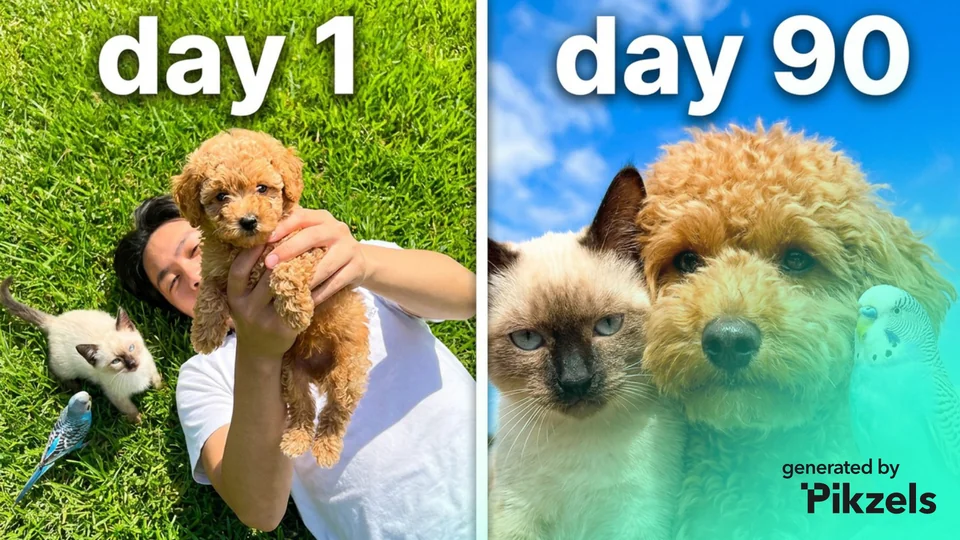

Pikzels-branded examples supplied to Thumb Maker. They were not generated during a Thumb Maker product test, and no CTR result is established.
Check Pikzels’ current features and plan terms before subscribing.
Affiliate link: opens Pikzels. Thumb Maker is an independent publisher and may earn a commission. The referral is not a coupon.
Canva: generate an idea, then control the layout
Canva’s AI thumbnail maker accepts a description and offers limited daily free image generation. Designs can continue into the Canva editor for text and other adjustments. This is a useful route to investigate when manual layout work is part of your process. Higher generation access depends on the plan; free access does not mean every asset or feature is free. Read the Pikzels vs Canva comparison for that specific choice.
Adobe Express: Firefly images with an editing workspace
The Adobe Express AI thumbnail generator uses Adobe Firefly and supports continuing with image edits in Express. Its documentation also describes style and composition reference images. An Adobe account is required. Check the current generative-credit allowance and plan features before treating it as an unlimited free tool.
vidIQ: start from footage, a YouTube link or a description
The vidIQ thumbnail maker offers these three starting inputs. Its Thumbnails help page describes text/image editing and generation capacity that depends on the plan and account. Compare that workflow if you already have footage to turn into a thumbnail concept. Vendor claims about clicks are not proof of a CTR improvement on your channel.
YouTube Ask Studio: generate inside the publishing workflow
YouTube’s custom-thumbnail help describes suggestions informed by a video’s transcript and themes. Select the video or add reference images, request a thumbnail, then use follow-up instructions to revise it. YouTube’s 24 July 2026 announcement describes this generation workflow for long-form videos.
Check access first. The Ask Studio eligibility page says it is available to most creators globally through computer web browsers. Official Artist Channels, Made for Kids channels and creators under 18 are excluded. If the Ask Studio control is missing, access is unavailable to that account. These pages do not specify a fixed thumbnail-generation allowance or a separate generation price; this guide does not promise unlimited free access.
If the native workflow meets your needs, evaluate it before adding another subscription. If you need a different starting point, compare the other tools using the same truthful brief. Access to an assistant, a usable image and a measured channel result are three separate checks.
How to choose without buying the wrong workflow
Identify the step you want to improve: creating a first concept, working from existing footage, precise text placement, or making repeated revisions. Use the same video brief and your own source material for each candidate. Record how many attempts you need, how much manual editing remains and whether the result represents the video accurately. This is a suggested comparison process; it has not been performed by Thumb Maker on these five workflows.
A free plan may be enough to explore an editor, while a dedicated subscription may make sense for a repeated task. Compare the total commitment and usable workflow, rather than assuming a larger generation allowance delivers more publishable thumbnails. None of the product documentation establishes that one tool will increase your CTR.
Explore Pikzels if that workflow fits
Consider a separate subscription only if its prompt/reference, revision or Persona/Style workflow solves a task you expect to repeat. Use the credit calculator to allow for discarded concepts and edits as well as planned videos.
Affiliate link: Thumb Maker may earn a commission if a visitor subscribes through the following link. It opens Pikzels; the referral does not confirm a discount.
What can Pikzels do?
- Prompt-to-thumbnail: describe a scene and generate thumbnail options.
- Recreate: use a reference thumbnail image URL as the starting point for a new thumbnail.
- Edit: request changes with text instructions.
- Persona and Style: reuse a trained likeness and visual style.
- Thumbnail analysis: receive feedback on a thumbnail and title.
- Titles: generate title ideas alongside the image.
These features are described on Pikzels’ official website. This is a guide based on public product information, rather than a hands-on performance test.
How to brief an AI thumbnail maker
Start with the promise of your video. A thumbnail should help a viewer understand why the video is interesting. Write down the subject, one point of tension and the image that makes that tension easy to see.
- Name one main subject. Identify the person, object or result that should attract attention first.
- Specify the composition. Say where the subject sits and which area needs space for text.
- Describe the contrast. Use a visible difference, such as old versus new, small versus large, or a problem versus its result.
- Limit the message. Give the image one clear job. Save supporting details for the video.
- Review a small preview. Check whether the subject and any text remain legible when the thumbnail is reduced.
Use the free YouTube thumbnail prompt generator to turn your own video topic, subject and layout into a main brief, a simpler alternative and an edit brief. It writes planning text, not images or performance predictions.
Three starting prompts
The following are original brief examples. They have not been generated or tested in Pikzels; adapt them to the actual content of your video.
For a gaming video
Example brief: “Create a YouTube thumbnail about completing a difficult racing challenge. Show one racing car in the foreground, a visible finish line in the distance and a bold contrast between the car and the track. Leave a clear area for a short text label. Keep the scene uncluttered.”
Keep the visual tied to your footage. A dramatic image loses its value if viewers click and find a different challenge.
For a tutorial
Example brief: “Create a thumbnail for a beginner tutorial on organizing a desk. Show a clear before-and-after composition with the same desk on both sides. Make the difference readable at a small size. Use a neutral background and leave space for a two-word label.”
Use your real result as a reference when possible. Showing the outcome can make the topic easier to understand than showing every step.
For a product comparison
Example brief: “Create a thumbnail comparing two desk microphones. Give each microphone equal visual space, use a clean dividing line and leave room for a short comparison label. Keep the background simple and avoid suggesting a winner through size alone.”
Check that both products are recognizable and that the image represents the comparison you actually make.
Who should consider Pikzels?
A dedicated thumbnail workflow may be useful if you publish regularly, need several concepts for each video or want a consistent visual identity. Before subscribing, identify the task you want to shorten: creating concepts, making revisions or keeping your face and style consistent.
If you already have a design workflow you like, compare the time required to produce a usable thumbnail. Read the Pikzels vs Canva comparison to compare AI generation, manual editing and plan limits. A generated first draft still needs editorial judgment: check the message, text, visual accuracy and match with the video.
What does Pikzels cost?
Pikzels offers paid plans and a credit system. The Pikzels pricing guide separates the annual payment from its monthly equivalent and explains credit use. Check the final price and renewal terms before subscribing.
Looking for a promotion? Read the current Pikzels discount-code information. A referral link alone does not confirm a discount.
Will an AI thumbnail improve my click-through rate?
A new thumbnail is a hypothesis to test. For a thumbnail-only experiment, keep the title unchanged and compare distinct image concepts on the same video. YouTube’s A/B testing documentation allows up to three options and evaluates results by watch time, rather than CTR alone. Access requires advanced features and a computer; Shorts, private videos and certain other formats/content are excluded. Check the current eligibility before planning a test. It can take up to two weeks, and insufficient impressions may leave the result inconclusive. A generator’s score or an attractive image is not evidence of improvement on your channel.
Check the file and budget before publishing
Use the YouTube thumbnail checker to inspect a candidate at small display sizes and check its dimensions, aspect ratio and device-specific file limit. It processes the selected image locally in the browser. File checks and a visual preview are separate from a test with real viewers.
Before an annual subscription, use the Pikzels credit calculator to count planned generations, edits, analyses and titles. Alternative concepts and retries also belong in the budget; a published maximum image count is not a promise of that many finished designs.
Ready to explore the workflow?
Affiliate disclosure: Thumb Maker is an independent publisher and may earn a commission through the following Pikzels links. The links open Pikzels, and the referral does not confirm a discount.
Visit Pikzels to see its current features and subscription options. Use the brief above to judge whether it fits the videos you make.
by
Tags:
Leave a Reply
You must be logged in to post a comment.